Phaze Relay Setup
Last updated: September 23, 2026
This guide covers the network side of a Phaze Relay deployment: which ports need to be open, in which direction, and where the relay should physically sit in your network. Installing the relay binary itself (systemd unit, user account, key provisioning) is covered by readme.txt in the relay archive — this document picks up after the binary is on the box and focuses on firewalls, NAT, and routing.
Installing and updating the relay
Operating system and network requirements
Linux x86_64 or arm64
One inbound UDP port (default 41000) reachable from hosts and clients
Outbound TCP 443 to relay.phaze.app (the default --ws-host; if you set --ws-host to a different signaling host, allow that one instead)
A relay key (phz_rk_...) from the Phaze admin panel
systemd (standard on most Linux distros)
Tools available on PATH: curl, unzip, sha256sum (used by the updater)
Downloading the relay to your Linux device
First, you'll need unzip. If you don't already have it, download it with:
sudo apt update && sudo apt install -y curl unzipAfter installing unzip, you should choose the right version of the relay based on your hardware. Phaze offers an x86 compatible and ARM compatible version of the relay binary.
x86 command:
wget https://public.phaze.app/relay/latest/phaze-relay-linux-amd64.zip &&
unzip phaze-relay-linux-amd64.zip
Arm command:
wget https://public.phaze.app/relay/latest/phaze-relay-linux-arm64.zip &&
unzip phaze-relay-linux-arm64.zip
Verifying the download
Before installing, confirm the archive matches the published checksum:
sha256sum -c SHA256SUMSEach line should print "OK". If anything else appears, re-download the archive from the original source — do not proceed.
Installation
The bundled install.sh script handles install end-to-end:
sudo ./install.shFor cloud-init, Ansible, or any automated provisioning, pass the key on the command line and skip the prompt:
sudo ./install.sh --key=phz_rk_...Reinstalling
Re-running install.sh on an already-configured host prints a hint and exits. To reinstall from scratch using the files in the zip (regenerates the unit file with a fresh key prompt), pass --force:
sudo ./install.sh --forceUpdating
After the install above, applying a new release is one command:
sudo /usr/local/bin/phaze-relay-updateThe update script:
Fetches the latest version from the Phaze CDN
Verifies its SHA-256 checksum
Stops the service, swaps the binary, restarts it
Replaces itself with the newer version of the script
Saves the previous binary to
/usr/local/bin/phaze-relay.prevfor manual rollback if anything goes wrong
If the bundled phaze-relay.service template has changed (e.g. new hardening directives), the script saves it as /etc/systemd/system/phaze-relay.service.new and prints a notice. Your live unit (which contains your relay key) is never modified. Review and merge changes manually if desired. Force a reinstall even if you are already on the latest version:
sudo /usr/local/bin/phaze-relay-update --forceOutbound TCP 443 — relay → Phaze signaling. The relay opens a single persistent WebSocket to the Phaze signaling host (by default
relay.phaze.app) to receive connection requests. It is always the relay that initiates this connection; the signaling host never initiates anything inward.Inbound UDP — peers → relay. All Phaze hosts and clients that need to use this relay send UDP packets to it on a single port (default 41000). This is the only inbound flow the relay accepts.
Outbound UDP — relay → peers. The relay forwards UDP packets back out the same socket to whichever peer is on the other end of a connection. Almost all firewalls let this through automatically as the reply side of the inbound flow, but it is worth being explicit when writing rules.
The relay never initiates a new connection into a peer's network. Peers always reach out first, and the relay replies. That asymmetry is the basis for most of the DMZ rules below.
Public address and port
In the Phaze admin panel, every relay has two fields that matter for networking:
Public address — the IP or hostname that hosts and clients will be told to send packets to. This is injected into the connection candidates the signaling server hands to each peer.
Public port — the UDP port on that address. Defaults to 41000.
The relay does not auto-discover these. Whatever you put in the admin panel is what peers will use, so it has to match the externally reachable address and port for the relay machine.
Two consequences worth calling out:
The public port and the relay's listen port do not have to match. The relay's
--udp-port(default 41000) is the port the binary binds to locally. If your firewall does port translation — for instance, advertising UDP/443 publicly and forwarding it to the relay's UDP/41000 — then the admin panel's "public port" is 443 and the systemd--udp-portflag is 41000. Both peers will be told to use UDP/443; your firewall translates.If the relay is reachable on different addresses from different networks (e.g. one IP from the internet, a different IP from inside your LAN), choose the address that both groups of peers can route to. In practice this almost always means the externally reachable address — internal hosts can usually route to a DMZ IP just fine, while internet clients can't route to a private one.
Standard configurations
Relay in a DMZ
The most common enterprise deployment: Phaze hosts (the workstations being remoted into) sit on the internal LAN, Phaze clients (the people doing the remoting) come in from the internet, and the relay sits in a DMZ segment between the two.
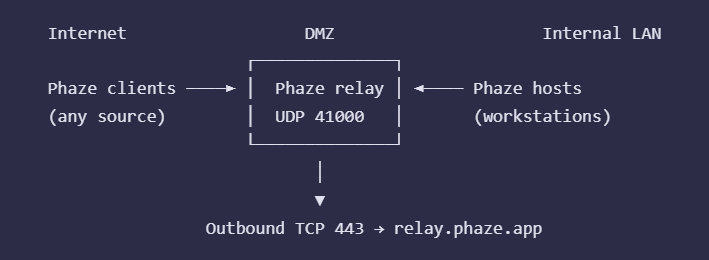
Place the relay VM/host in the DMZ segment. Give it a private IP in the DMZ subnet, and either a dedicated public IP or a NAT mapping on your external firewall.
External firewall (internet → DMZ):
Allow inbound UDP to the relay's public IP on port 41000, from any source. If you have a known set of client IP ranges, restrict to those; otherwise leave the source open.
Allow outbound TCP 443 from the relay to the signaling host (
relay.phaze.appby default).Deny everything else.
This is what lets Phaze clients on the WAN reach the relay, and lets the relay reach Phaze's signaling endpoint.
Internal firewall (LAN ↔ DMZ):
Allow outbound UDP from your Phaze host workstations to the relay's DMZ IP on port 41000.
Deny inbound DMZ → LAN by default.
The Phaze hosts initiate UDP outward to the relay, which means the internal firewall is permitting egress from LAN to DMZ. There is no need to allow DMZ → LAN traffic, because the relay never initiates connections into your network — return packets are part of the already-established UDP flow that the host opened.
Admin panel:
Public address: the relay's public IP (or DNS name).
Public port: 41000 (or whatever your external rule allows).
Fully internal relay
The relay, hosts, and clients all sit on the same private network. No internet exposure. Used in air-gapped environments, or when both ends of the remote-desktop session are inside the same corporate network and the goal is just to give IT a single point of policy enforcement.
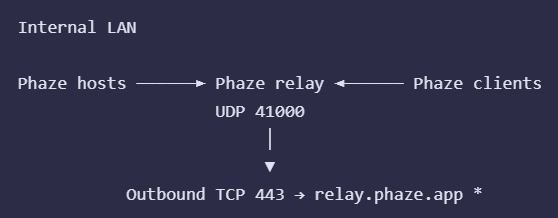
The relay still needs to reach Phaze's signaling host for the connection setup to work. If the network is genuinely air-gapped, talk to us — that's a different deployment model and not what this guide covers.
Place the relay on a network segment that both VLANs can reach (a dedicated services VLAN is the cleanest option; a DMZ also works).
Firewall:
Allow UDP/41000 from the Workstations VLAN to the relay's IP.
Allow UDP/41000 from the Contractors VLAN to the relay's IP.
No inter-VLAN host↔client rules are needed — they never talk to each other directly; everything flows via the relay.
Allow outbound TCP/443 from the relay to the signaling host.
Admin panel:
Public address: the relay's IP on a segment both VLANs can route to.
Public port: 41000.
Relay with a load balancer
On cloud setups, you may want to put a load balancer in front of the relay location. On AWS, for example, you can configure a single AWS Network Load Balancer with multiple UDP listeners and forward the various ports to different relays. These ports must match the public ports in the admin panel. The AWS Network Load Balancer public IP would be the public IP address used for the relays behind the NLB.
Verifying reachability
After you wire up the firewall rules, the easiest end-to-end check is to look at the relay's status in the admin panel: it should show as "online" within a few seconds of starting the service. That confirms the outbound TCP/443 leg is working.
For the inbound UDP leg, the simplest test is to attempt a real Phaze connection from a representative host and client. The relay's journal (journalctl -u phaze-relay -f) will log incoming packets when --log-level debug is set on the ExecStart line.
If you want to confirm UDP reachability without involving a Phaze client, from a peer machine you can send a probe packet:
echo "probe" | nc -u -w1 <relay-public-address> 41000You won't get a meaningful reply (the relay drops unrecognized packets silently), but the relay's debug log will show the packet arriving with its source address. If nothing arrives in the log, the path is blocked somewhere between the peer and the relay — check each firewall hop in order.
Choosing a UDP port
The default is 41000 because it's outside the well-known and ephemeral port ranges on every common OS, so it almost never collides with anything else. Pick a different port if:
41000 conflicts with another service on the relay machine.
Your network policy requires a specific port (e.g. UDP/443 to look like QUIC, or a port that's already permitted by an existing firewall rule you can't change).
You're running multiple relays behind the same public IP — each needs its own externally-reachable port, mapped via NAT to each relay's listen port.
Change the relay's listen port by editing the --udp-port value on the ExecStart line in /etc/systemd/system/phaze-relay.service, then:
sudo systemctl daemon-reload sudo systemctl restart phaze-relayIf the externally-visible port differs from the relay's listen port (because of NAT), update the public port in the admin panel to match what peers will dial.
Determining how many relays you need
This is a difficult question to answer due to several variables involved. The bitrate, CPU, and memory provisioned to your relay machine impact the answer. Additionally, your employees' workloads determine usage of those allocated resources. For that reason, we generally ask that customers install several relays per location and monitor the metrics. Phaze load balances connections across relays in a location. Metrics for each relay are viewable on the location page.

Phaze monitors the number of connections, the current bitrate and the percentage of CPU and memory in-use in real-time. Phaze will soon send alerts to admins if relays are running out of memory or compute.
Common issues and things you may need
Troubleshooting
The first thing to check, in nearly every case, is the service status and recent logs:
sudo systemctl status phaze-relay
sudo journalctl -u phaze-relay -e
The service won't start
Most common causes:
The relay key is missing or still set to the placeholder. The easiest fix is to re-run the updater, which detects this and prompts for the key:
sudo /usr/local/bin/phaze-relay-updateOr edit /etc/systemd/system/phaze-relay.service by hand, then:
sudo systemctl daemon-reload
sudo systemctl restart phaze-relay
The "phaze-relay" user doesn't exist. install.sh creates it
The UDP port is already in use by another process. Find what's holding it:
sudo ss -ulnp | grep ':41000'Stop that process or change the relay's --udp-port (see below).
Logs show "unauthorized" at startup
The relay key is invalid or has been revoked. Generate a new one in the admin panel, update /etc/systemd/system/phaze-relay.service, then:
sudo systemctl daemon-reload
sudo systemctl restart phaze-relay
The relay shows as offline in the admin panel
The service is actually running:
sudo systemctl status phaze-relayOutbound TCP 443 is allowed by your firewall.
DNS resolves the signaling host. By default this is relay.phaze.app:
host relay.phaze.appIf you've overridden --ws-host in phaze-relay.service, check that hostname instead.
The relay's public address configured in the admin panel matches a real address that hosts and clients can reach from the internet.
No connections are arriving
Confirm the UDP port (default 41000) is open for inbound traffic on the host firewall and any upstream firewall/NAT:
Ubuntu / Debian
sudo ufw allow 41000/udpRHEL / Fedora / Rocky
sudo firewall-cmd --add-port=41000/udp --permanent
sudo firewall-cmd --reload
Confirm the public address registered in the admin panel is correct
and reachable from the public internet (not just from inside your
network).
If the relay sits behind NAT (for example, on a private network
behind a router), confirm that the public UDP port configured in
the admin panel is forwarded to the relay machine on the port the
relay is listening on. The two ports do not have to match — for
example, the admin panel can advertise UDP/443 publicly while your
router forwards UDP/443 to the relay's UDP/41000 — but the forward
must be in place. Reachability of the public IP alone is not
enough; without the port forward, packets reach your router and
are dropped.
Increase log verbosity (see below) and watch the journal while a
client tries to connect — you should see incoming packets logged.
Increase log verbosity
Edit /etc/systemd/system/phaze-relay.service and add --log-level debug to the ExecStart line, then:
sudo systemctl daemon-reload
sudo systemctl restart phaze-relay
sudo journalctl -u phaze-relay -f
Switch back to info once you're done — debug logs are noisy.
Change the UDP port
Edit /etc/systemd/system/phaze-relay.service, change the --udp-port
value, then:
sudo systemctl daemon-reload
sudo systemctl restart phaze-relay
Open the new port in your firewall and update the relay configuration
in the admin panel to match.
Where are settings stored?
All configuration lives on the ExecStart line in /etc/systemd/system/phaze-relay.service. There is no separate config file. Relay state is in-memory; it is lost on restart but reconstructed automatically as hosts and clients reconnect.
Notes on direction and trust
A few properties of the relay that affect how to think about firewall rules:
The relay only ever sends UDP to addresses it has already received UDP from. It does not initiate outbound UDP to peers it hasn't heard from. This is why a stateful firewall in front of the relay doesn't need an explicit outbound UDP rule for peer traffic — the replies match the inbound flow's state.
The relay does not terminate the encrypted session. Packets pass through it encrypted end-to-end between host and client; the relay routes by a connection ID embedded in each packet but cannot read the contents. From a data-exposure standpoint, a compromised relay can disrupt traffic but cannot read what's inside the streams.
The relay holds no persistent state. Restarting the service drops its in-memory routing table; connections re-establish naturally as hosts and clients reconnect. There is nothing on disk to encrypt or audit beyond the systemd unit and the binary itself.
The relay key (the
phz_rk_...value in the systemd unit) is the only secret on the box. It authenticates the relay to the Phaze signaling backend. Rotate it by generating a new one in the admin panel and replacing the value in the unit file. There are no per-peer credentials on the relay.